
All project finance features in one product, updated in real time.
CostDesk is designed so that every project's financial figures are always accurate, current and immediately readable.

Every cost incurred, tagged to the right project and category.
Actual costs in CostDesk are recorded per project and classified by category, cost centre and activity.
Record costs as they happen
No waiting for month-end. Costs recorded in real time.
Classify by your business structure
Costs tagged to cost centres, activities and categories.
Compare to budget in real time
Every cost entry instantly compared to project budget.
Input data for PnL
Actual costs feed directly into PnL and project health scores.
Full cost history per project
Every project has complete cost history from day one.
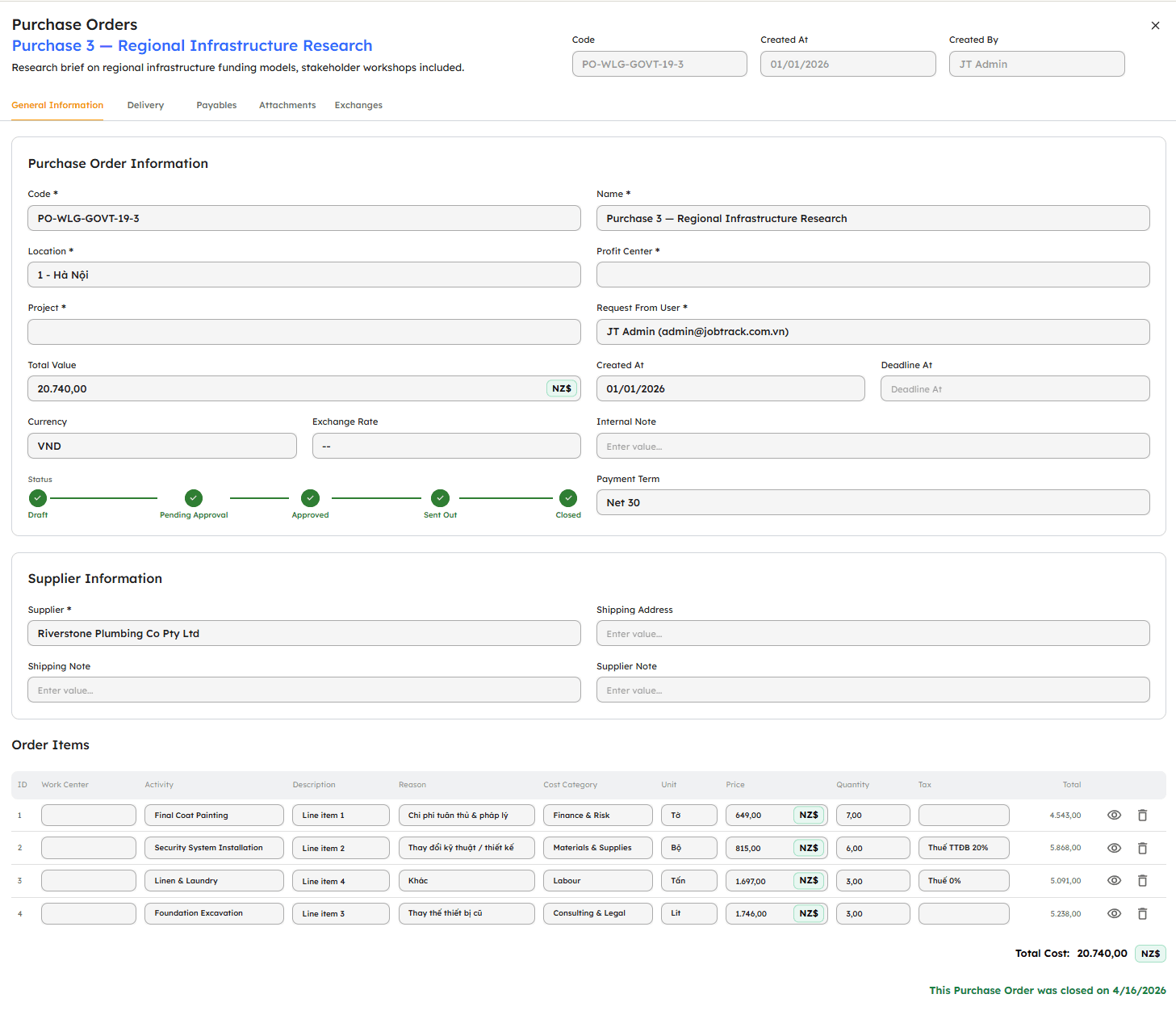
Control costs before money goes out, not after.
Commitments in CostDesk are Purchase Orders approved and linked to projects.
POs linked directly to projects
Every Purchase Order created and linked to a specific project.
Approval workflow by permission
POs require approval before becoming effective.
Commitments shown alongside actual costs
Project dashboard shows both spent costs and open PO values.
Track PO lifecycle from creation to close
POs have clear statuses: pending · approved · closed · cancelled.
Commitments are reference only, not in PnL
Unrealised PO values don't affect PnL, shown as reference data only.
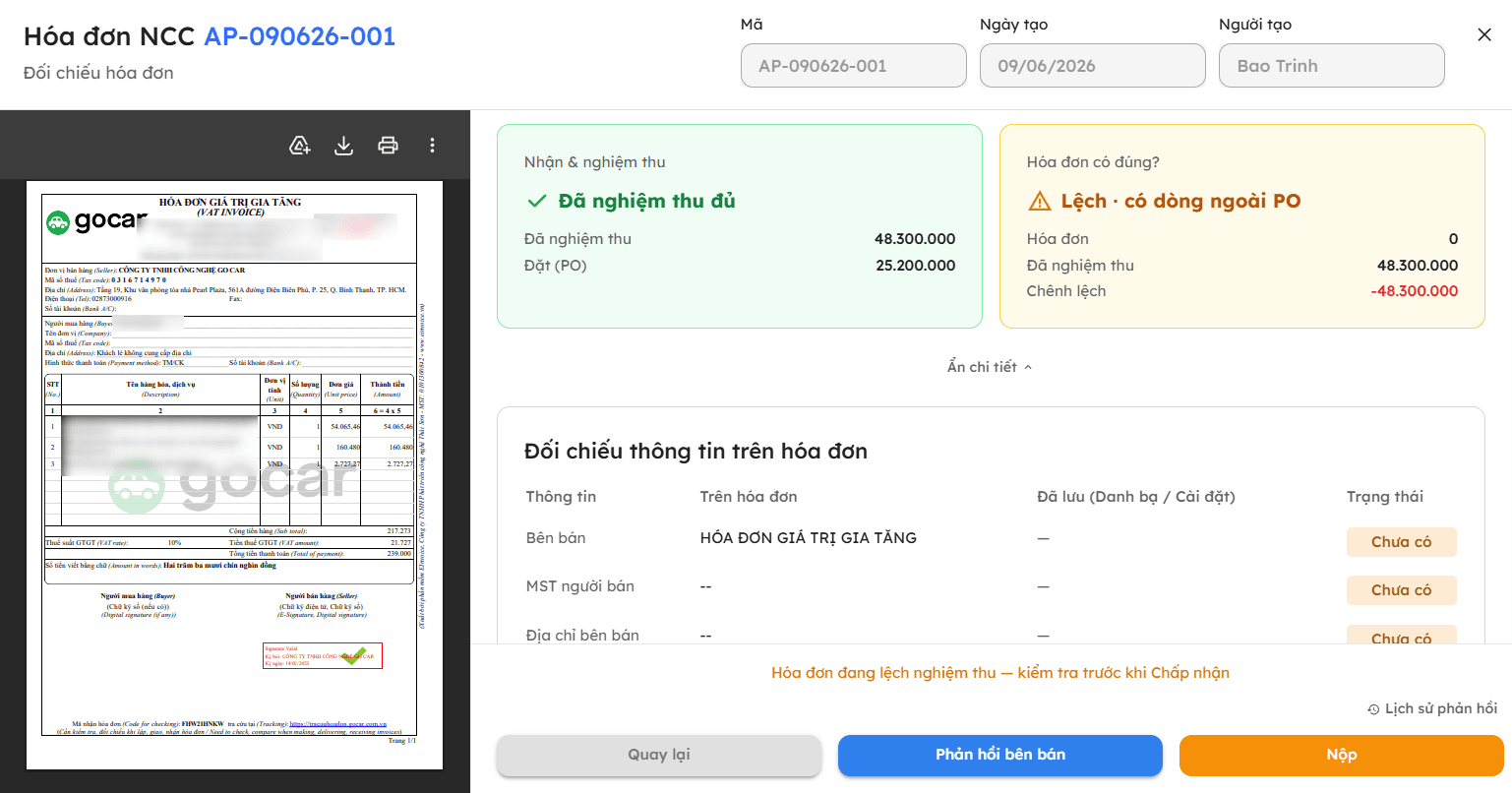
Match supplier invoices automatically, with no manual entry and no mismatches.
Payable invoices are matched three ways against purchase orders and goods receipts, automatically and accurately.
Automatic three way matching
CostDesk matches each invoice line to its purchase order and goods receipt, with no manual checking.
Handles the tricky cases
One invoice across several purchase orders, or one order delivered in batches: still matched correctly.
Surfaces every discrepancy
Quantity, price or tax gaps are flagged instantly, with the exact difference.
Reads invoice data for you
The order number, supplier and amount are captured from the file or email, cutting data entry.
Reply straight to the supplier
Raise a correction or flag a mismatch on the invoice itself, so both sides follow one thread.
Full trail for reconciliation
Every create, edit, approve and reject action is logged for audit.
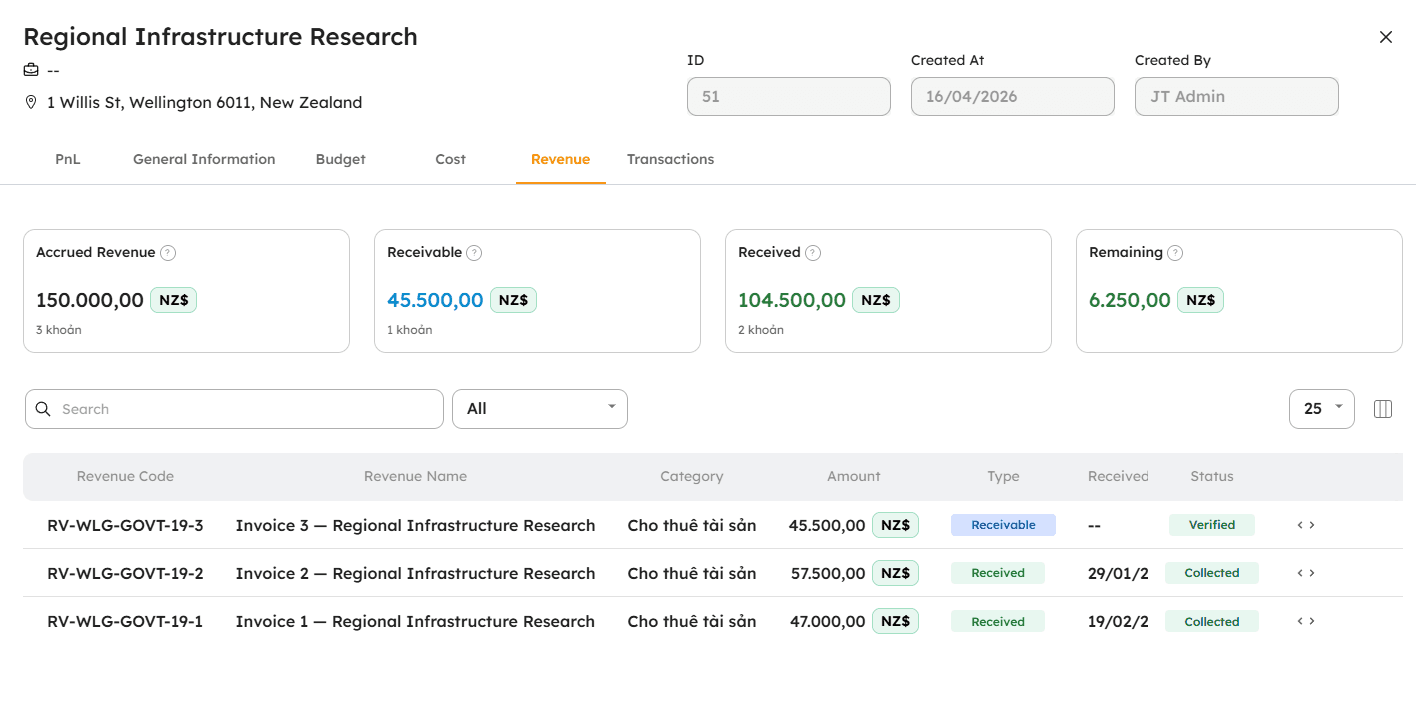
Work done ≠ money received. CostDesk tracks both.
Earned revenue reflects completed work value. Collections are cash received.
Earned revenue: know how much work is done
Record revenue portion matching completed work.
Collections: know how much cash is in
Record each payment received per project separately.
Unrecorded portion: the remaining revenue opportunity
Gap between contract value and earned revenue.
Receivables per project
Earned but uncollected revenue. Tracked per project and client.
Accurate input for PnL
PnL uses earned revenue only, not contract value.
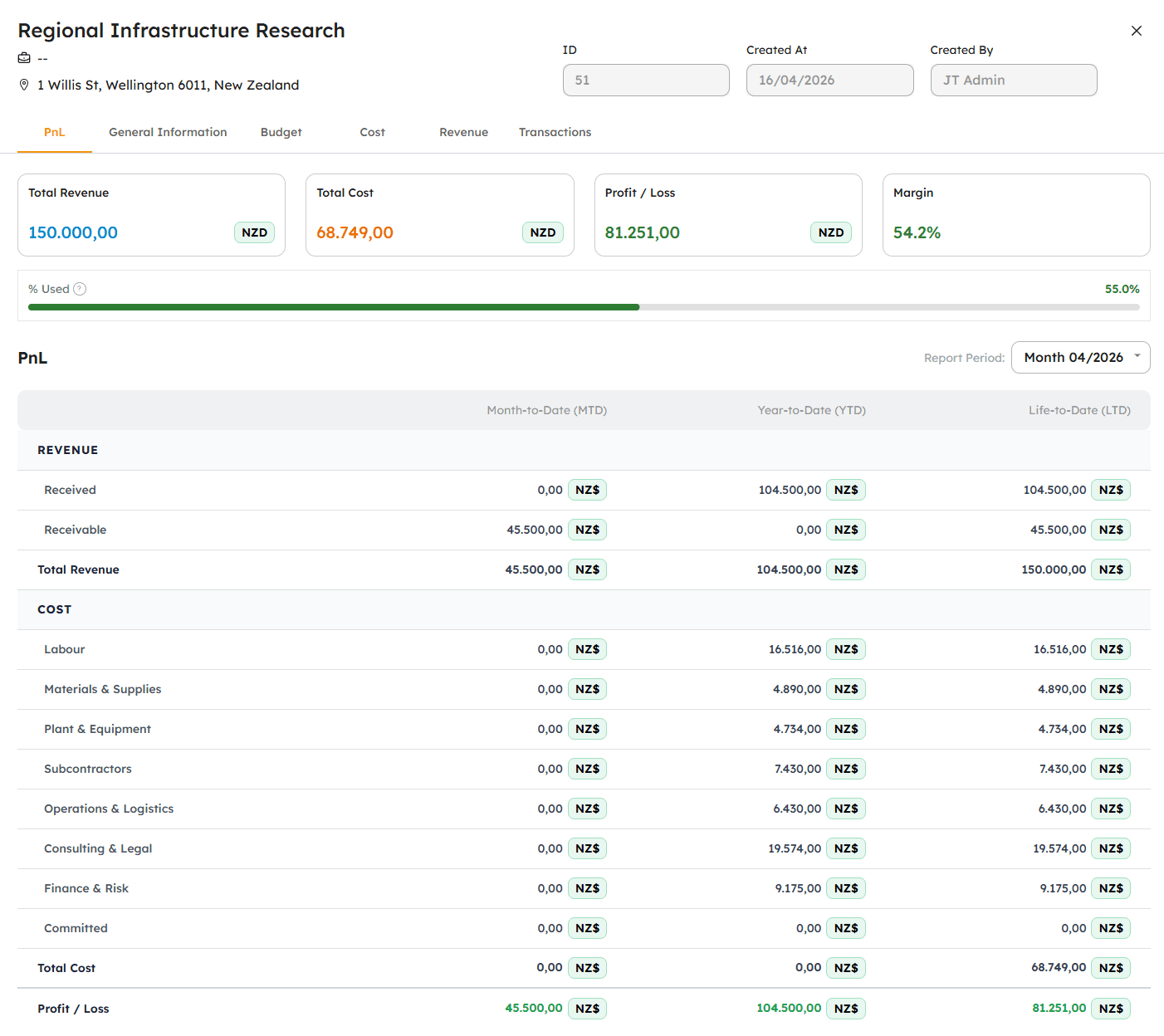
Real profit and loss, automatic and per project, with no waiting for accounting.
PnL in CostDesk is calculated automatically from actual costs and recorded revenue.
PnL per project, not just totals
Every project has its own profit/loss report.
Automatic data, no manual entry
PnL calculated from actual costs and recorded revenue.
View by period (MTD) or lifetime (LTD)
Filter PnL by month or entire project lifetime.
Company-wide PnL from all projects
Consolidated profit/loss across all active projects.
Commitments are reference, not in PnL
Unrealised PO values excluded from profit/loss formula.
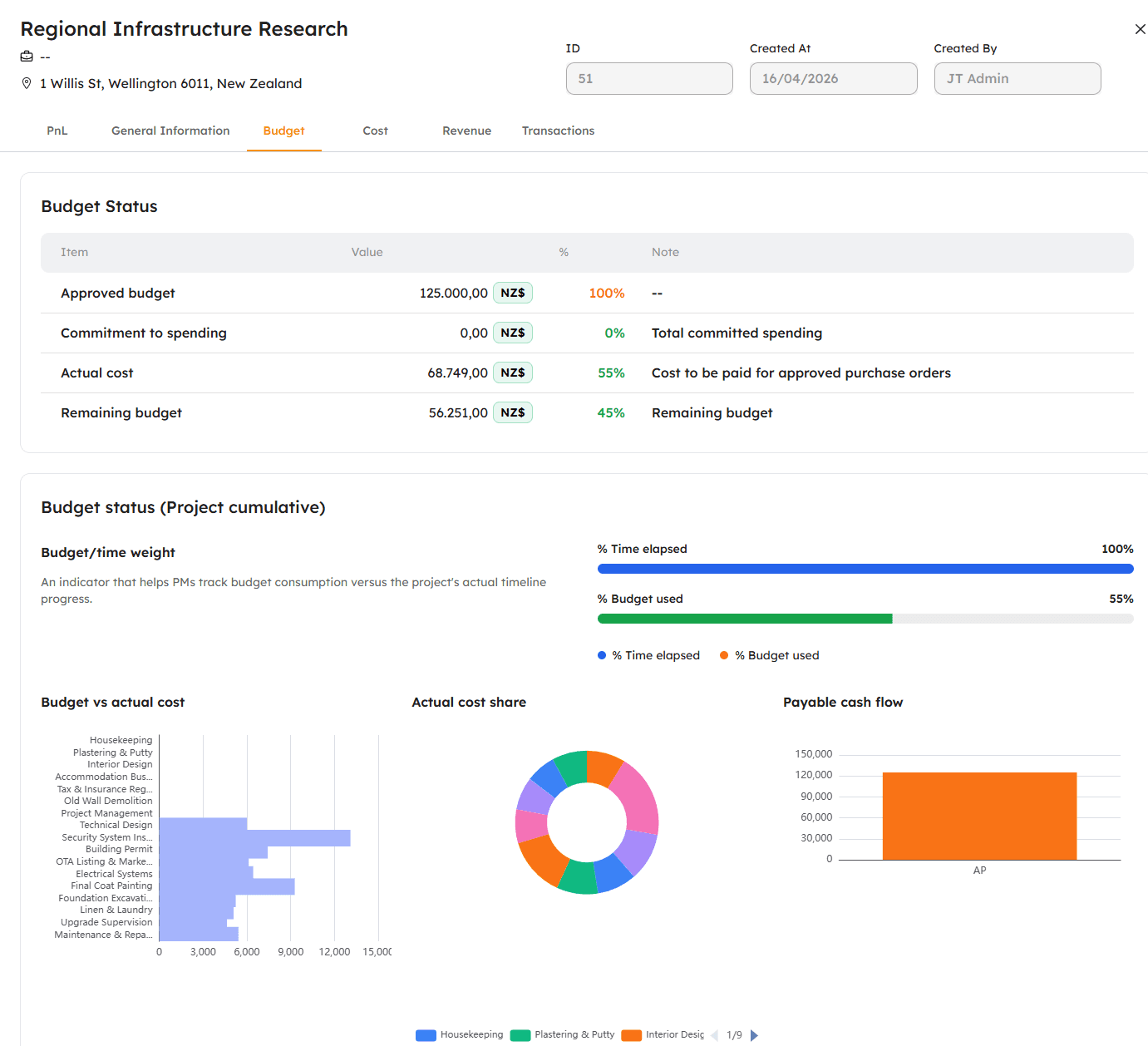
Project budget: set once, compare continuously.
Set budgets per project, category and cost centre. Every cost entry instantly compared to plan.
Budget by category and work centre
Allocate budget in detail following your business cost structure.
Actual vs plan comparison in real time
Every cost recorded is automatically compared to its budget line.
Visual budget utilisation
Progress bars per category, see at a glance how much remains.
Commitments included in warning threshold
Remaining budget = budget minus actual costs and open POs. No surprises.
Foundation for project health score
Cost-to-budget ratio is one of the factors in the project health calculation.
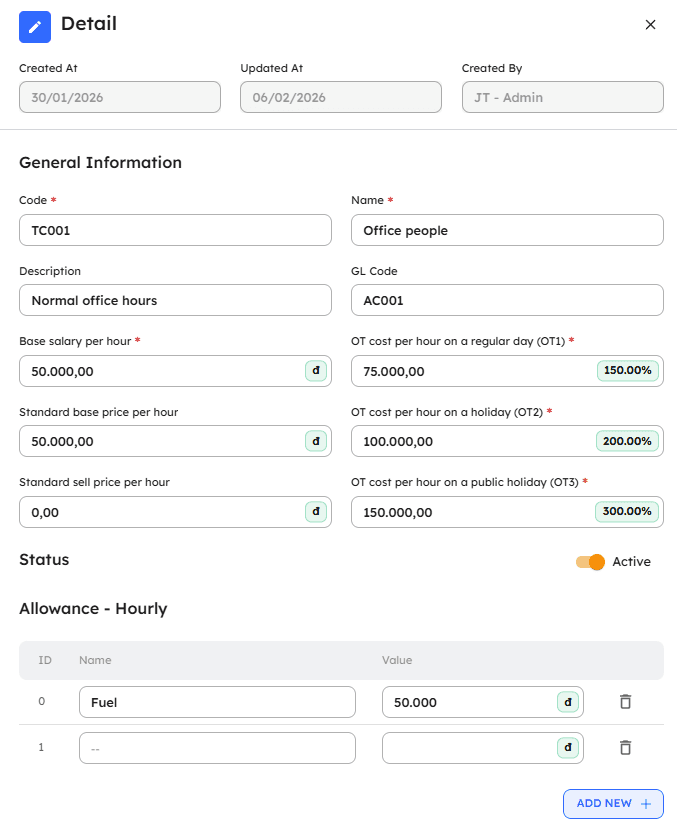
Accurate labour costs, no guessing, no flat allocation.
Record work hours per project, activity and cost centre. Calculate real labour costs as input for PnL and project health.
Clock in per project and activity
Every timesheet entry linked to a project, work centre and specific activity.
Timesheet approval workflow
Timesheets require approval before counting towards project costs.
Automatic labour cost calculation
From hours × rate per employee type. No manual cost entry.
Allocate staff across multiple projects
One person working on multiple projects, with hours allocated accurately per project.
Input data for actual costs
Labour costs from timesheets automatically feed into project actual costs.

Every contract has its own billing model, and CostDesk supports them all.
Lump sum, progress based, output based, cost plus: choose the billing type that matches each project. Revenue and PnL calculated correctly per contract logic.
Lump Sum: a single fixed price
Fixed total contract value. Revenue recognised by completion percentage.
Progress based
Revenue recognised by percentage complete or milestones achieved.
Output or unit based
Revenue calculated per output unit (hours, products, work units).
Cost plus: cost plus a margin
Revenue = actual costs + agreed margin percentage. PnL always positive by design.
Choose per project
Each project can have its own billing type. Not limited to one model.

Financial status across the whole company on one screen, continuously updated.
Financial overview shows the health of every project and the company overall.
Project health shown by colour status
Each project scored: Positive · At Risk · Overdrawn · Negative.
Dashboard for the whole company, updated automatically
Consolidated costs, revenue and PnL across all active projects.
Drill down when needed
Click any project for detailed costs, commitments, revenue and PnL.
Don't confuse operational finance with accounting
Overview reflects real operational status, not end of period accounting.
Access from any device
Financial dashboard accessible from browser on desktop and mobile.

Project financial data is not just for viewing, it is for timely action.
Project health in CostDesk is a composite score continuously updated from costs, commitments, revenue and PnL.
Health score calculated automatically
From actual costs vs. budget, commitments, earned revenue and current PnL.
4 clear statuses
Positive · At Risk · Overdrawn · Negative: see at a glance, no reports needed.
Continuously updated in real time
Every new entry updates the health score immediately.
Overview dashboard by health status
See all projects by health status, and prioritise those needing attention.
Foundation for timely decisions
Know problems before they become serious, with enough time to act.

Know before it becomes a problem, don't wait for month end reports.
System automatically alerts when project financial metrics exceed your thresholds. Rule based, transparent, no black box.
Alert when costs exceed budget threshold
Set a threshold (e.g. 80%), and the system alerts when cumulative costs hit it.
Alert when commitments + actuals exceed budget
Total open POs + actual costs approaching the danger zone.
Alert when revenue falls behind plan
When collections are significantly lower than earned revenue.
Alert when project health changes status
When a project moves from Positive to At Risk, or from At Risk to Overdrawn.
In-app notifications
Alerts linked to specific projects and specific metrics, not generic messages.
Want to see CostDesk in action?
Contact us for a 30-minute chat, no installation, no data prep needed.